

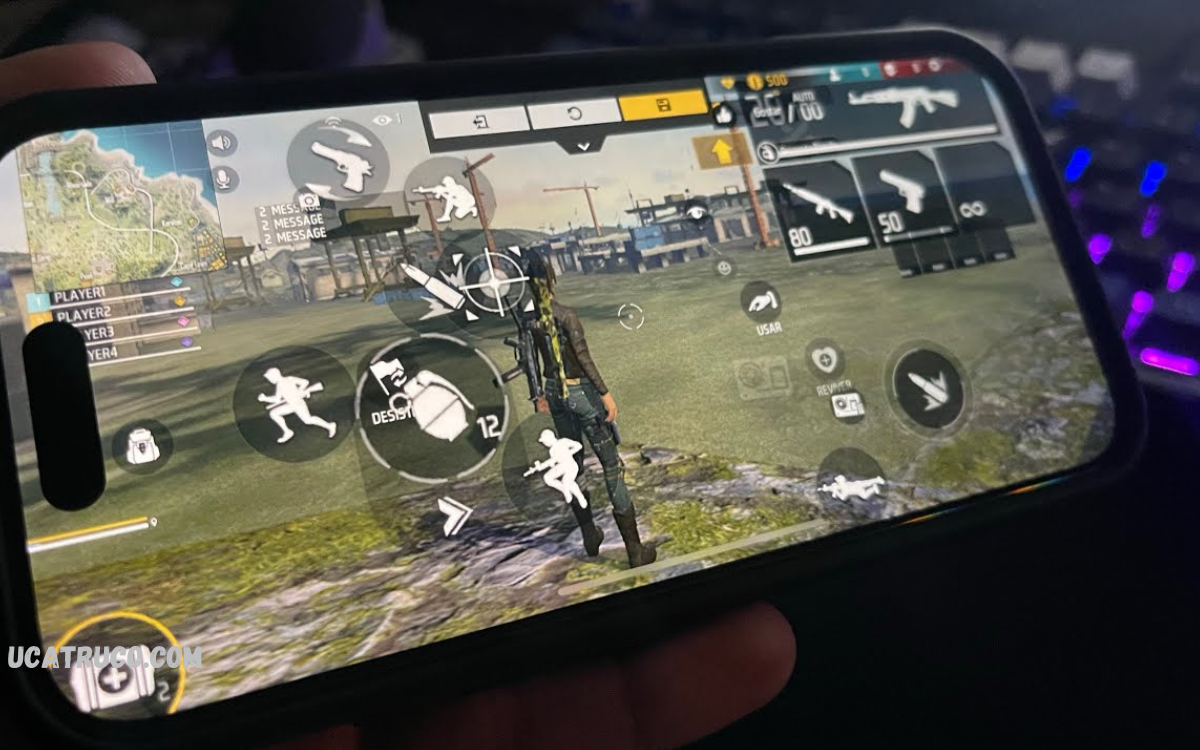
Free Fire, precision, speed, and comfort are key to dominating every match. One of the most effective ways to enhance your gaming experience is through a Custom White HUD (Heads-Up Display). Unlike the default interface, a custom HUD allows players to personalize the layout of controls, buttons, and sensitivity settings, giving them complete control over gameplay.
Custom White HUDs are designed to optimize accessibility, ensuring that every action from shooting and aiming to moving and healing is smoother and faster. By adjusting the placement of key buttons to match your play style, you can reduce reaction time, increase accuracy, and gain a competitive edge over opponents.
What Is Custom White HUD for Free Fire?
A Custom White HUD for Free Fire is a modified heads-up display tailored to player preferences. Unlike the default HUD, which has fixed positions for controls, a custom HUD allows complete customization. Players can adjust the size, placement, and opacity of buttons, making gameplay smoother and more precise.
The white theme is especially popular due to its clean, modern design. It improves visibility against various game environments, ensuring players can track enemies and important in-game elements without distraction.
Benefits of Using Custom White HUD
1. Enhanced Accuracy
Custom layouts place critical controls like shooting, aiming, and grenade throwing in comfortable positions. This reduces finger movement, allowing faster reaction times and better aiming accuracy.
2. Faster Gameplay
Optimized button placement accelerates in-game actions. Players can reload, heal, or swap weapons seamlessly, giving them an edge over opponents in close combat situations.
3. Minimalistic Design
The white HUD theme eliminates unnecessary distractions. Clean interface enhances focus and reduces visual clutter, crucial during high-intensity battles.
4. Better Screen Visibility
White buttons contrast sharply with most Free Fire backgrounds. This ensures critical actions are always visible, preventing mistakes in chaotic fights.
5. Personalization
Gamers can design HUDs according to their play style. Aggressive players might prioritize attack buttons, while strategic players may focus on movement and inventory access.
How to Install Custom White HUD for Free Fire
Installing a Custom White HUD for Free Fire requires simple steps:
- Open Free Fire and navigate to Settings > Controls > HUD.
- Select Custom HUD mode.
- Adjust button placement, size, and transparency according to personal preference.
- Save layout and test in Training Mode for optimization.
Pro tip: Always experiment in practice mode before using in ranked matches. Small adjustments can significantly improve performance.
Top Features of Custom White HUD
- Adjustable Button Size: Ensures comfortable thumb placement.
- Transparent Buttons: Maintains clear visibility of the map.
- Flexible Layouts: Players can move every button freely.
- Quick Access Controls: Faster healing, weapon swap, and skill activation.
- Cross-device Compatibility: Works across phones, tablets, and emulators.
Why White HUD Is Preferred?
Gamers prefer white HUDs for both aesthetics and performance. Bright, visible buttons reduce strain during long gaming sessions. Unlike dark HUDs that blend with shadows, white buttons stand out, making target tracking easier. Additionally, white HUD complements many skins and in-game elements, enhancing the overall gaming experience.
Tips for Optimizing Custom White HUD
- Focus on Primary Actions: Place frequently used buttons where fingers naturally rest.
- Avoid Overcrowding: Too many buttons in one area can cause misclicks.
- Test Sensitivity Settings: Combine HUD layout with optimal sensitivity for best results.
- Adjust Button Transparency: Balance visibility and screen view.
- Update Regularly: Free Fire updates may require minor HUD adjustments.
Common Mistakes to Avoid
- Overcomplicating layouts with unnecessary buttons.
- Ignoring personal comfort in favor of copying popular HUDs.
- Neglecting testing before ranked matches.
- Using extreme sizes that block screen view.
Read Also: How Many Heroic Stars Are Required to Achieve Mastery
Who Should Use Custom White HUD?
Custom HUDs are ideal for:
- Professional Gamers: Gain competitive advantage.
- Casual Players: Improve comfort and gameplay efficiency.
- Streamers: Enhance visibility for audience engagement.
- New Players: Learn game controls faster with a personalized interface.
Performance Impact
Properly configured Custom White HUD for Free Fire improves reaction time and accuracy without affecting device performance. Unlike third-party apps that can cause lag or ban risks, official custom HUDs within Free Fire are safe and optimized for smooth gameplay.
Combining HUD with Sensitivity Settings
For maximum efficiency, pair custom HUD with optimized sensitivity:
- Red Dot Sight: Medium sensitivity for precise aiming.
- Scope: Slightly lower sensitivity for steady shots.
- General Movement: Adjust for fast navigation.
Combined with a well-designed white HUD, sensitivity tuning ensures smoother gameplay and faster response to enemy movements.
FAQs
Is Custom White HUD free in Free Fire?
Yes, Free Fire provides official HUD customization for free. Players only need to adjust settings in-game.
Can I use the same HUD on multiple devices?
Yes, HUD layouts can be synced using the same Free Fire account.
Does HUD customization affect rank?
No, it only improves comfort and reaction time, which can indirectly enhance performance.
Can HUD layouts be reset?
Yes, players can reset HUD to default at any time.
Conclusion
A Custom White HUD for Free Fire is an essential tool for any gamer seeking performance, comfort, and style. It improves accuracy, speeds up gameplay, and ensures better visibility. Personalization allows players to create layouts suited to their play style, providing a competitive edge in every match. By following installation steps, optimizing layouts, and pairing with sensitivity adjustments, players can elevate their Free Fire experience significantly.
Adopting a custom HUD isn’t just about aesthetics; it’s about maximizing potential and dominating the battlefield with precision. For serious gamers and casual players alike, a Custom White HUD for Free Fire is a must-have tool for success.
